Methods
-
get_input_handler_boolean_field(field, object)
-

Returns the chosen boolean field value of the object.
Check out the third party documentation for a more in depth explanation.Parameters:
Name Type Description fieldthe value to get
objectobject to get values from
Code Equivalent:
object.input.field.copyFrom(value); -
get_input_handler_numeric_field(field, object)
-

Returns the chosen numeric field value of the object.
Check out the third party documentation for a more in depth explanation.Parameters:
Name Type Description fieldthe value to get
objectobject to get values from
Code Equivalent:
object.input.field.copyFrom(value); -
get_input_handler_point_field(field, object)
-

Returns the chosen point field value of the object.
Check out the third party documentation for a more in depth explanation.Parameters:
Name Type Description fieldthe value to get
objectobject to get values from
Code Equivalent:
object.input.field -
input_handler_bounds_rect_set(object, rect)
-

Sets the boundary of where the sprite is restricted while being dragged.
Check out the third party documentation for a more in depth explanation.Parameters:
Name Type Description objectobject to set the boundary for
rectrectangle that defines the boundary
Code Equivalent:
object.input.boundsRect = rect; -
input_handler_check_pixel(x, y, object)
-

Returns true/false if the alpha value at the given location is greater than or equal to the object's pixelPerfectAlpha value.
Check out the third party documentation for a more in depth explanation.Parameters:
Name Type Description xNumber x coordinate to check
yNumber y coordinate to check
objectobject to check
Code Equivalent:
object.input.checkPixel(x, y) -
input_handler_check_pointer_down(pointer, object)
-

Returns true/false if the pointer is currently clicking on the object.
Check out the third party documentation for a more in depth explanation.Parameters:
Name Type Description pointerpointer to check
objectobject to check
Code Equivalent:
object.input.checkPointerDown(pointer) -
input_handler_check_pointer_over(pointer, object)
-

Returns true/false if the pointer is on top of the object.
Check out the third party documentation for a more in depth explanation.Parameters:
Name Type Description pointerpointer to check
objectobject to check
Code Equivalent:
object.input.checkPointerOver(pointer) -
input_handler_destroy(object)
-

Destroys the input handler for the object.
Check out the third party documentation for a more in depth explanation.Parameters:
Name Type Description objectobject to destroy the handler for
Code Equivalent:
object.input.destroy(); -
input_handler_disable_drag(object)
-

Stops the object from being dragged. If it is currently being dragged, it will be stopped immediately.
Check out the third party documentation for a more in depth explanation.Parameters:
Name Type Description objectobject to disable drag on
Code Equivalent:
object.input.disableDrag(); -
input_handler_disable_snap(object)
-

Stops the object from snapping to a grid while being dragged and released.
Check out the third party documentation for a more in depth explanation.Parameters:
Name Type Description objectobject to disable snap for
Code Equivalent:
object.input.disableSnap(); -
input_handler_down_duration(object)
-

Returns the number of milliseconds the mouse has been clicking on the object.
Check out the third party documentation for a more in depth explanation.Parameters:
Name Type Description objectobject to check
Code Equivalent:
object.input.downDuration() -
input_handler_enable(object)
-

Enables an object to use input handler methods and events.
Check out the third party documentation for a more in depth explanation.Parameters:
Name Type Description objectobject to enable the input handler on
Code Equivalent:
object.inputEnabled = true; -
input_handler_enable_drag(object)
-

Allows the object to be clicked and dragged by the mouse.
Check out the third party documentation for a more in depth explanation.Parameters:
Name Type Description objectobject to enable dragging on
Code Equivalent:
object.input.enableDrag(); -
input_handler_enable_drag_complex(object, center, top, pixel, alpha)
-
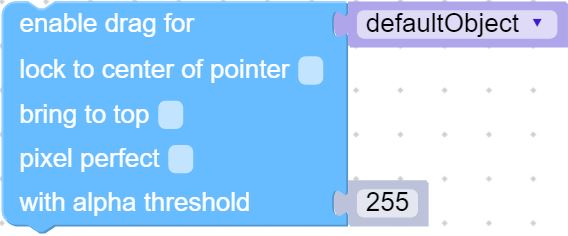
Allows the object to be clicked and dragged by the mouse, with customizable options.
Check out the third party documentation for a more in depth explanation.Parameters:
Name Type Description objectobject to enable dragging on
centerBoolean If false the Sprite will drag from where you click it minus the dragOffset. If true it will center itself to the tip of the mouse pointer
topBoolean If true the object will be displayed on top of everything else
pixelBoolean If true it will use a pixel perfect test to see if you clicked the object. False uses the bounding box
alphaBoolean If pixel perfect is true, this specifies the alpha level needed for collision to be processed
Code Equivalent:
object.input.enableDrag(center, top, pixel, alpha); -
input_handler_enable_snap(object, x, y)
-

Make the object snap to the given x/y grid when being dragged or released.
Check out the third party documentation for a more in depth explanation.Parameters:
Name Type Description objectobject to snap
xNumber the width of the grid to snap to
yNumber the height of the grid to snap to
Code Equivalent:
object.input.enableSnap(x, y); -
input_handler_enable_snap_complex(object, x, y, drag, release, offset_x, offset_y)
-
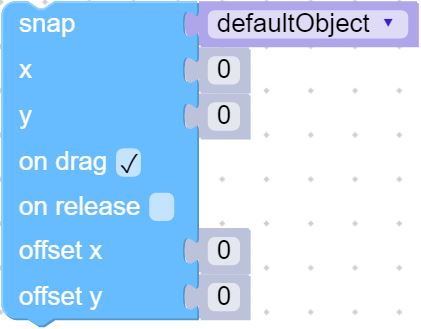
Make the object snap to the given x/y grid when being dragged or released, with customizable options.
Check out the third party documentation for a more in depth explanation.Parameters:
Name Type Description objectobject to snap
xNumber the width of the grid to snap to
yNumber the height of the grid to snap to
dragBoolean makes the object snap to the grid while being dragged
releaseBoolean makes the object snap to the grid when released
offset_xNumber offsets the top left starting point of the grid
offset_yNumber offsets the top left starting point of the grid
Code Equivalent:
object.input.enableSnap(x, y, drag, release, offset_x, offset_y); -
input_handler_is_pixel_perfect(object)
-

Returns true/false if the object is using pixel perfect checking.
Check out the third party documentation for a more in depth explanation.Parameters:
Name Type Description objectobject to check
Code Equivalent:
object.input.isPixelPerfect() -
input_handler_just_out(object, time)
-

Returns true/false if the pointer left the object's bounds within the given duration.
Check out the third party documentation for a more in depth explanation.Parameters:
Name Type Description objectobject to check
timeNumber duration to check
Code Equivalent:
object.input.justOut(0, time) -
input_handler_just_over(object, time)
-

Returns true/false if the mouse has entered the object's bounds within the given time.
Check out the third party documentation for a more in depth explanation.Parameters:
Name Type Description objectobject to check
timeNumber time to check
Code Equivalent:
object.input.justOver(0, time) -
input_handler_just_pressed(object, time)
-

Returns true/false if the object was clicked on within the given time.
Check out the third party documentation for a more in depth explanation.Parameters:
Name Type Description objectobject to check
timeNumber the duration to check
Code Equivalent:
object.input.justPressed(0, time) -
input_handler_just_released(object, time)
-

Returns true/false if the object was released on within the given time.
Check out the third party documentation for a more in depth explanation.Parameters:
Name Type Description objectobject to check
timeNumber the duration to check
Code Equivalent:
object.input.justReleased(0, time) -
input_handler_over_duration(object)
-

Returns the number of milliseconds the mouse has been hovering over the object.
Check out the third party documentation for a more in depth explanation.Parameters:
Name Type Description objectobject to check
Code Equivalent:
object.input.overDuration() -
input_handler_pointer_down(object)
-

Returns true/false if the pointer is down.
Check out the third party documentation for a more in depth explanation.Parameters:
Name Type Description objectobject to check
Code Equivalent:
object.input.pointerDown() -
input_handler_pointer_dragged(object)
-

Returns true/false if the object is currently being dragged.
Check out the third party documentation for a more in depth explanation.Parameters:
Name Type Description objectobject to check
Code Equivalent:
object.input.pointerDragged() -
input_handler_pointer_out(object)
-

Returns true/false if the pointer is outside of the object's bounds.
Check out the third party documentation for a more in depth explanation.Parameters:
Name Type Description objectobject to check
Code Equivalent:
object.input.pointerOut() -
input_handler_pointer_position(object)
-

Returns a point containing the x & y coordinates of the pointer, relative to the top-left of the anchor of the object.
Check out the third party documentation for a more in depth explanation.Parameters:
Name Type Description objectobject to check
Code Equivalent:
position -
input_handler_pointer_up(object)
-

Returns true/false if the pointer is up.
Check out the third party documentation for a more in depth explanation.Parameters:
Name Type Description objectobject to check
Code Equivalent:
object.input.pointerUp() -
input_handler_pointer_x(object)
-

Returns the x coordinate of the pointer, relative to the top-left of anchor of the object.
Check out the third party documentation for a more in depth explanation.Parameters:
Name Type Description objectobject to check
Code Equivalent:
object.input.pointerX() -
input_handler_pointer_y(object)
-

Returns the y coordinate of the pointer, relative to the top-left of anchor of the object.
Check out the third party documentation for a more in depth explanation.Parameters:
Name Type Description objectobject to check
Code Equivalent:
object.input.pointerY() -
input_handler_reset(object)
-

Resets the input handler for the object, and disables it.
Check out the third party documentation for a more in depth explanation.Parameters:
Name Type Description objectobject to reset the input handler for
Code Equivalent:
object.input.reset(); -
input_handler_set_drag_lock(object, horizontal, vertical)
-

Locks dragging for the object in certain directions.
Check out the third party documentation for a more in depth explanation.Parameters:
Name Type Description objectobject to lock dragging for
horizontalBoolean enables/disables the object from being dragged horizontally
verticalBoolean enables/disables the object from being dragged vertically
Code Equivalent:
object.input.setDragLock(horizontal, vertical); -
input_handler_start(object, priority)
-

Starts the Input Handler. This is automatically called if input is enabled on an object. Higher priority objects take click priority when objects are stacked on top of each other.
Check out the third party documentation for a more in depth explanation.Parameters:
Name Type Description objectobject to start input handler for
priorityNumber the priority of the object
Code Equivalent:
object.input.start(priority); -
input_handler_stop(object)
-

Stops the Input Handler from running on the object.
Check out the third party documentation for a more in depth explanation.Parameters:
Name Type Description objectobject to affect
Code Equivalent:
object.input.stop(); -
set_input_handler_boolean_field(field, object, value)
-

Assigns the chosen boolean field for the object.
Check out the third party documentation for a more in depth explanation.Parameters:
Name Type Description fieldthe value to set
objectobject to assign values for
valuevalue to set the field to
Code Equivalent:
object.inputEnabled = true; -
set_input_handler_numeric_field(field, object, value)
-

Assigns the chosen numeric field for the object.
Check out the third party documentation for a more in depth explanation.Parameters:
Name Type Description fieldthe value to set
objectobject to assign values for
valuevalue to set the field to
Code Equivalent:
object.input.field = value; -
set_input_handler_point_field(field, object, value)
-

Assigns the chosen point field for the object.
Check out the third party documentation for a more in depth explanation.Parameters:
Name Type Description fieldthe value to set
objectobject to assign values for
valuevalue to set the field to
Code Equivalent:
object.input.field.copyFrom(value);